
Start with the right bottleneck
Focus on lead flow, revenue, offers, content, time, systems, AI readiness, or founder sustainability.
PromptMint Pro OS
PromptMint Pro OS gives solo operators a protected operating workspace with guided OS modules, practical templates, prompt frameworks, AI response capture, workspace notes, and PDF-style work records — so your business bottlenecks become clearer next actions.
Choose access if you already know what needs attention. Start with the diagnostic if you want help finding your strongest bottleneck first.
Founder launch note: During the founder launch, access may be activated manually after your order is confirmed. You’ll receive setup instructions by email once your workspace access is ready.
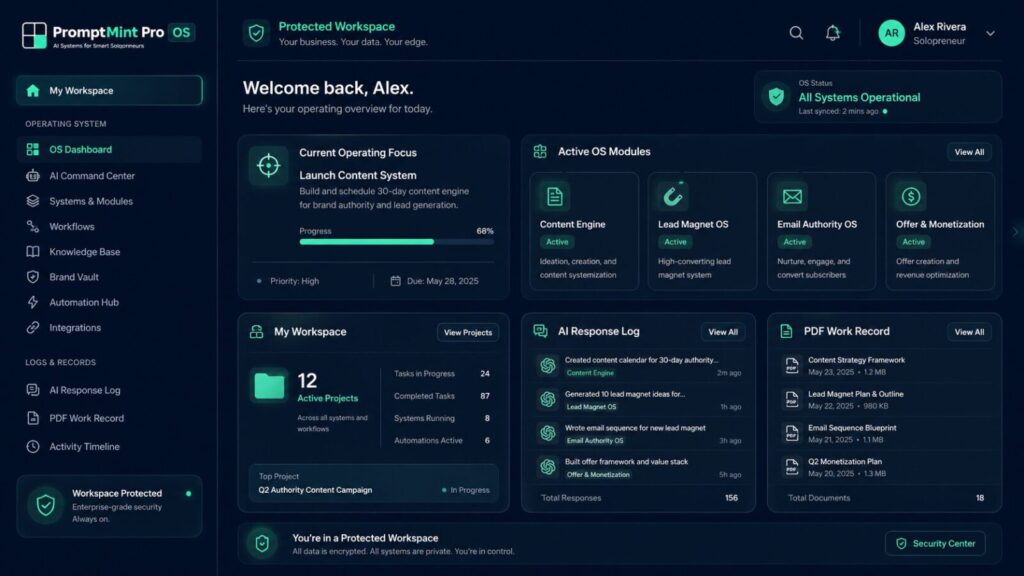
PromptMint Pro OS helps you identify what needs attention, work through it using guided modules and templates, and turn your thinking—including useful AI responses—into clearer decisions, organised work records, and practical next actions.
Focus on lead flow, revenue, offers, content, time, systems, AI readiness, or founder sustainability.
Use structured workspaces, templates, checklists, prompt frameworks, and decision guardrails.
Use your preferred AI tool, then save the valuable response, takeaway, and next action inside your workspace.
Keep notes, progress, decisions, and next steps together, with a PDF-style summary you can review later.
Start with one OS module, three connected modules, or all eight current modules.
This is not a course, prompt pack, AI chatbot, or instant automation tool. It is a protected working environment for solopreneurs who want to turn scattered business activity into focused, repeatable action.
Why this exists
A prompt can help you write faster. It can give you ideas. It can clean up a draft. But if the real problem is unclear priorities, weak follow-through, messy notes, or not knowing which bottleneck to fix first, another prompt usually adds more noise.
PromptMint Pro OS exists because solo business work needs a clearer operating layer. You need a way to decide what deserves attention, work through it in a structured way, and keep the useful parts instead of losing them inside chat history, notebooks, tabs, and half-finished documents.
Ideas, client work, admin tasks, content plans, follow-ups, and unfinished notes end up spread across too many places.
AI gives useful output, but the response often disappears into a chat thread instead of becoming part of a work record.
You start planning an offer, campaign, workflow, or content angle, but the work does not always turn into a finished asset.
It is not always obvious whether the real issue is leads, revenue, offer clarity, content, execution, systems, AI readiness, or founder energy.
The next action is not clear enough, so good thinking turns into another open tab, saved note, or half-finished draft.
You may have done the thinking, but there is no clean record of what you decided, what you tried, and what needs to happen next.
This solopreneur OS is built for this gap:: turning scattered work into focused operating sessions, guided modules, useful prompts, AI response capture, workspace notes, and PDF-style work records.
What this solopreneur OS helps you do
PromptMint Pro OS is not built to give you more things to copy and paste. It helps you slow down the right part of the business, work through it in a structured way, and keep the useful output where you can return to it.
Start with the business area that needs attention now, instead of jumping between leads, content, revenue, admin, and AI experiments.
Use focused modules for constraints such as revenue stability, time and execution, content visibility, offer clarity, systems, lead flow, AI readiness, and founder sustainability.
Put the messy situation into a structured format so you can see what is actually happening before asking AI for help.
Create prompts that are tied to the work you are doing, not random one-off prompts that disappear after one chat.
Use your preferred AI tool, then paste the useful response back into the AI Response Log so it becomes part of your project record.
Keep the important thinking, checklist progress, notes, useful takeaways, and next action in one workspace instead of spreading them across tabs and documents.
Turn the current project into a clean work record so you can review what was decided, what was created, and what needs to happen next.
In plain terms: PromptMint Pro OS works like a practical solopreneur OS because it connects, focus, use templates, use AI prompts, add notes, and work records in one guided workflow.
The goal is not to make the business look busier. The goal is to leave each work session with a clearer decision, a useful output, and a next action you can actually follow.
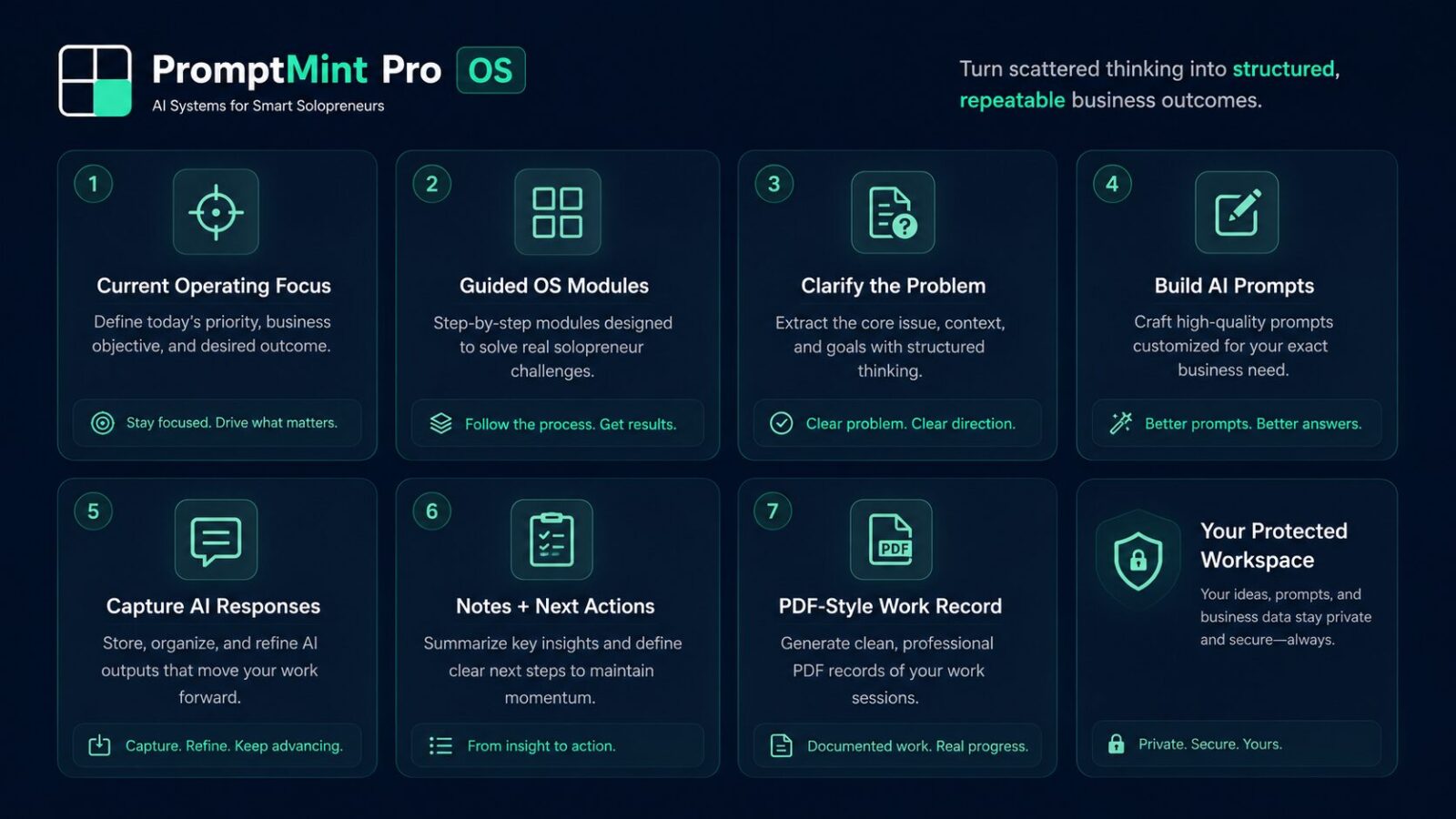
How the solopreneur OS workflow works
PromptMint Pro OS is built around a simple work loop. You start from the dashboard, open the OS module that matches your current focus, use the workbook and prompt tools to shape the work, capture useful AI output, organize the project record, and preview a clean PDF-style summary. That makes the solopreneur OS easier to use during real work, not just during planning.
Protected workspace loop
The dashboard shows where to focus. It gives you your current operating focus, active modules, checklist progress, workspace links, and next action.
The OS Module Workbench is where you do the work. Each unlocked module gives you a guided area for the specific business constraint you are working through.
The Prompt Workbook gives you module-linked prompt frameworks and scenario ideas, so you are not starting from a blank page or guessing what to ask AI.
Use your preferred AI tool, then paste the useful output into the AI Response Log. This helps turn a temporary AI response into something connected to your project.
My Workspace organizes the project record. It keeps your notes, checklist progress, prompt activity, AI response highlights, and next action together.
The PDF Work Record gives you a clean summary of the current project, including what you worked on, what you captured, and what needs to happen next.
Then you return to the dashboard with a clearer work record, a cleaner next action, and less scattered thinking than when you started.
OS access options
This solopreneur OS is built around access levels.. Your selected access controls which OS modules appear inside the protected app. Once your access is active, your dashboard and sidebar show the modules connected to your plan.
Focused start
Best for: One clear bottleneck
Choose this if you already know the one area that needs attention first. This is useful when the problem is specific, such as revenue stability, time and execution, content visibility, offer clarity, lead flow, systems, AI readiness, or founder sustainability.
What you see inside the app:
One unlocked OS module connected to your selected access.
Recommended path
Best for: Three connected operating areas
Choose this if your business problem is not isolated. The Solopreneur Diagnostic may point to three connected bottlenecks, such as revenue stability, time and execution, and content visibility. You can use those recommended modules as your starting point, or choose your own three if you already know what needs attention.
The Core OS Bundle gives you three OS modules so you can work through related areas with more structure instead of treating each problem as a separate issue.
What you see inside the app:
Three unlocked OS modules connected to your selected bundle. These can be based on your diagnostic results or your own manual choices before access is activated.
Use the diagnostic if you want help identifying the three modules that fit your current business bottlenecks.
Full current system
Best for: Solopreneurs who want every OS module available
Choose this if you want access to the full current PromptMint Pro OS system. This is for solopreneurs who want every module available for different projects, campaigns, offers, workflows, and review cycles.
What you see inside the app:
All eight current OS modules available inside your protected workspace.
Access clarity note: Unlocked modules are what you work with inside the app. Locked modules may appear as access context, but the full working areas are only available when that module is included in your active access.
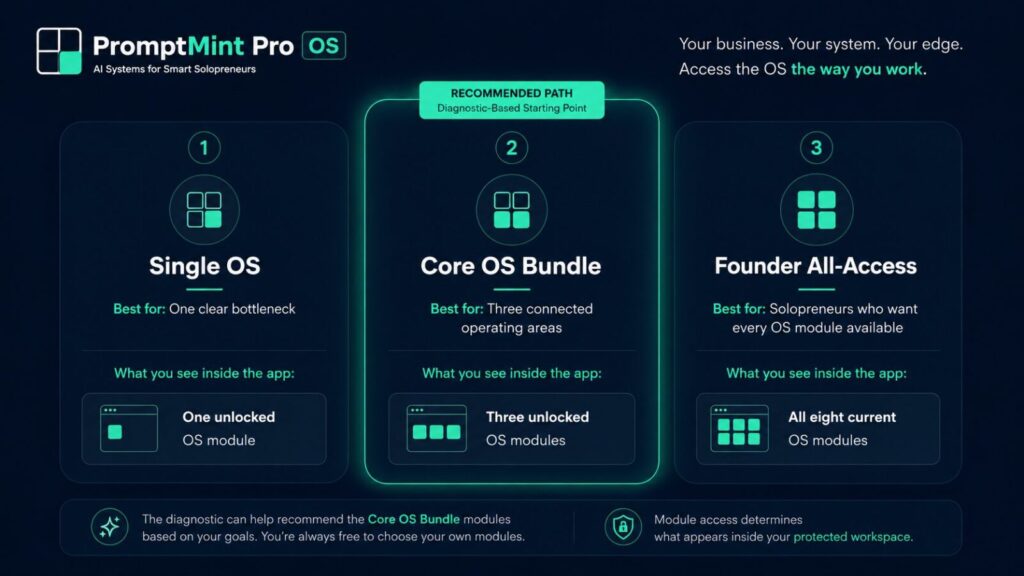
Choose access if you already know what needs attention. Start with the diagnostic if you want help finding your strongest bottleneck first.
Founder launch note: During the founder launch, access may be activated manually after your order is confirmed. You’ll receive setup instructions by email once your workspace access is ready.
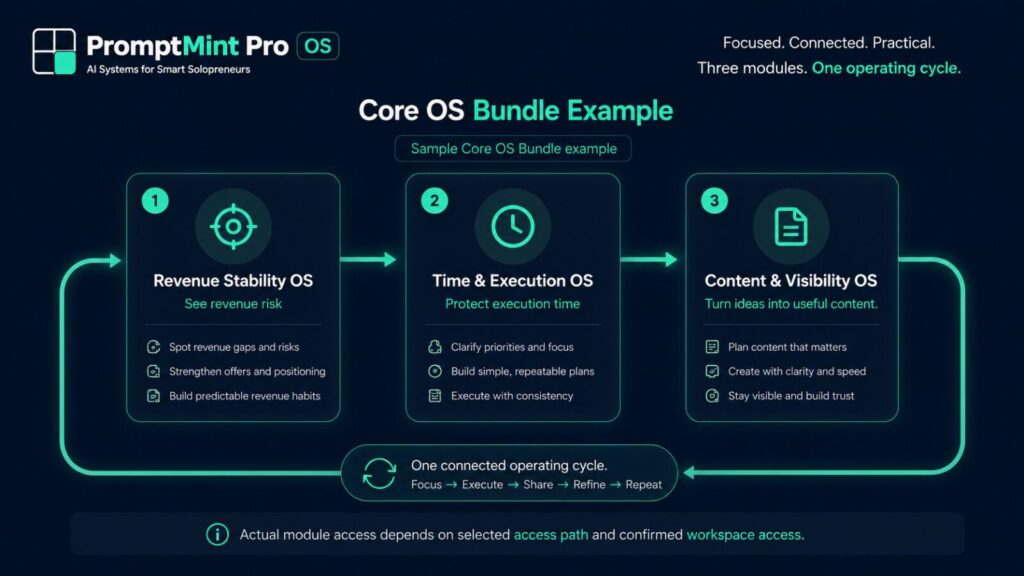
Core OS Bundle example
A solo business problem is rarely isolated. Revenue pressure can affect time, follow-through, content consistency, and decision-making. This example shows how three connected OS modules can support one practical operating cycle.
Module 01
Helps you see revenue risk before it becomes a bigger problem.
This module is useful when income feels irregular, follow-up is inconsistent, pricing feels unclear, or sales activity is not tied to a clear weekly rhythm.
Practical focus:
See the revenue gap, identify the pressure point, and choose the next sales or follow-up action.
Module 02
Helps you protect the time needed to do the work.
This module is useful when your calendar is full, but the important work keeps slipping. It helps you reduce task noise and choose a realistic execution focus.
Practical focus:
Turn scattered tasks into a weekly plan, protect one growth block, and define the next action.
Module 03
Helps you turn ideas into useful content that supports trust and buyer education.
This module is useful when you have ideas but no consistent publishing rhythm, weak CTAs, or content that does not clearly connect to your offer.
Practical focus:
Choose one content angle, connect it to the business problem, and create a useful post, email, or visibility asset.
How these three work together: Revenue Stability OS helps you identify the commercial pressure. Time & Execution OS helps you protect the working time to respond to it. Content & Visibility OS helps you turn the response into useful buyer-facing content.
Important note: This is a sample Core OS Bundle example. Your actual module access depends on the access path you choose, your diagnostic results if used, your own module choices, and confirmed workspace access.
What’s inside the PromptMint Pro solopreneur OS
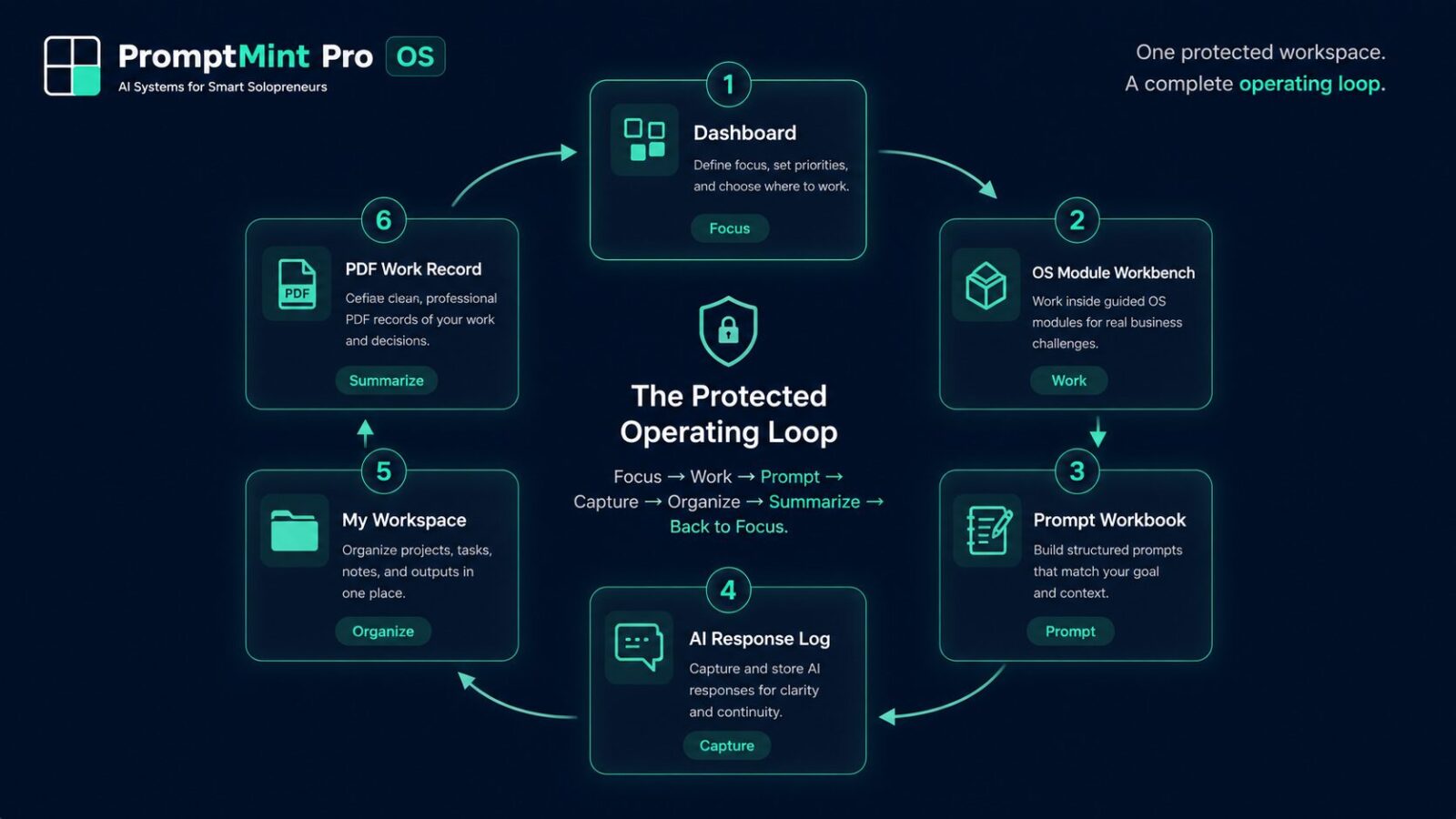
PromptMint Pro OS is built as a connected workspace, not a loose folder of prompts. Each app area supports a different part of the work session, from choosing the focus to capturing useful AI output and reviewing a PDF-style project summary.
Shows your current focus, active modules, checklists, quick actions, workspace links, and access state. This is where the work session starts.
Gives you a guided module workspace with templates, prompt areas, decision guardrails, action steps, and a minimum useful win for the selected business constraint.
Helps you browse prompt frameworks and scenario ideas connected to your unlocked OS modules, so you are not starting from a blank page.
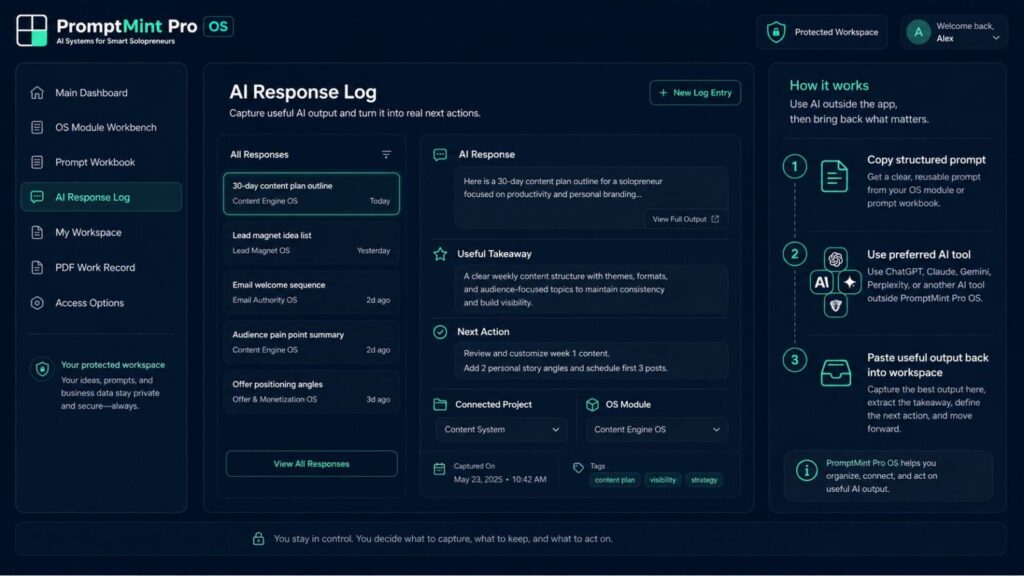
Lets you paste useful output from your preferred AI tool, write a useful takeaway, and turn the response into a practical next action.
Organizes project notes, checklist progress, prompt activity, AI response highlights, and next actions in one working area.
Lets you preview or export a clean project summary that brings together the work session, notes, checklist progress, prompt activity, AI response highlights, and next action.
Shows locked modules and access levels as context, so you can understand what else can be unlocked without mixing locked modules into your active sidebar.
Clarity note: The app is a protected workspace for active users. This sales page explains what the app contains, but it does not expose the full working areas, paid templates, or protected module content.
AI Response Log
PromptMint Pro OS does not replace your AI tool. You can use ChatGPT, Claude, Gemini, Perplexity, or another LLM you already prefer. The difference is what happens after the AI gives you an answer.
Your AI output finally has somewhere useful to land. Most useful AI responses get lost inside chat history. PromptMint Pro OS gives you a place to bring the useful parts back into your work session, connect them to the right OS module, and turn them into a next action.
Use the Prompt Workbook or module prompt area to shape what you want to ask your preferred AI tool.
Paste the prompt into the AI tool you already use. PromptMint Pro OS does not generate the response inside the app.
Paste the useful response into the AI Response Log, write the useful takeaway, and decide the next action.
The useful part of the answer you want to keep.
The insight, idea, rewrite, plan, or recommendation that matters.
The specific thing you will do with the response.
The business area where this response belongs, so it does not become another lost chat.
Clarity note: This solopreneur OS is built to organize AI-assisted work. It does not need to generate AI responses inside the app to be useful. The value is in giving your prompts, useful responses, notes, and next actions a clearer operating structure.
You can use your preferred AI tool outside the app, including tools such as ChatGPT, Claude, Gemini, or Perplexity.
Intro:
PromptMint Pro OS is built as a protected workspace, so it is important to understand what it does, what it does not do, and how access works during the founder launch.
A solopreneur OS is a structured workspace for managing solo business work, decisions, prompts, notes, and next actions. PromptMint Pro OS applies that idea through guided modules, templates, prompt frameworks, AI response capture, workspace notes, and PDF-style work records.
No. PromptMint Pro OS includes prompt frameworks, but the product is not just a prompt pack. The prompts sit inside a wider workspace that helps you choose a focus, work through an OS module, capture useful AI output, keep notes, and review a work record.
No. PromptMint Pro OS is not positioned as a course. It is closer to a working operating system for solopreneurs. Instead of watching lessons, you use guided modules, templates, prompts, notes, and response logs to work through a current business constraint.
No. The current version does not generate AI responses inside the app. You use your preferred AI tool, such as ChatGPT, Claude, Gemini, or another LLM, and then paste useful output back into the AI Response Log so it can support your project record.
The AI Response Log is where you paste useful output from your preferred AI tool. You can connect that response to a project or OS module, write the useful takeaway, and turn the response into a next action instead of leaving it buried inside an AI chat thread.
My Workspace is the area designed to organize your project notes, checklist progress, prompt activity, AI response highlights, and next actions. It helps keep your work session in one place instead of spreading the thinking across notes, tabs, and documents.
Yes. If you are not sure which OS modules fit your situation, start with the free diagnostic. It can help identify your strongest business bottlenecks and guide your Core OS Bundle choices. You can still make your own module choices before access is activated.
The PromptMint Pro solopreneur OS has three access levels: Single OS, Core OS Bundle, and Founder All-Access. Single OS is for one clear bottleneck. Core OS Bundle is for three connected operating areas. Founder All-Access is for solopreneurs who want all current OS modules available.
PromptMint Pro OS is not for people who want a passive course, a magic AI chatbot, instant full automation, or a public free app. It is for solopreneurs who are willing to work through structured modules, make decisions, use their preferred AI tool, and turn outputs into clearer next actions.
Choose access if you already know what needs attention. Start with the diagnostic if you want help finding your strongest bottleneck first.
Founder launch note: During the founder launch, access may be activated manually after your order is confirmed. You’ll receive setup instructions by email once your workspace access is ready.
We use cookies to improve your experience on our site. By using our site, you consent to cookies.
Manage your cookie preferences below:
Essential cookies enable basic functions and are necessary for the proper function of the website.
These cookies are used for managing login functionality on this website.
Stripe is a payment processing platform that enables businesses to accept online payments securely and efficiently.
Service URL: stripe.com (opens in a new window)
Statistics cookies collect information anonymously. This information helps us understand how visitors use our website.
Google Analytics is a powerful tool that tracks and analyzes website traffic for informed marketing decisions.
Service URL: policies.google.com (opens in a new window)
Google reCAPTCHA helps protect websites from spam and abuse by verifying user interactions through challenges.